A Laptop and a Book - Back to School
“A Laptop and a Book – Back to School” isn’t a physical product—it’s a ready-to-deploy digital asset designed for clarity, consistency, and creative control. It’s built for people who value intentionality in how they present ideas, organize learning, or signal transition—whether launching a course, rebranding a personal project, launching a seasonal content series, or simply resetting daily habits. This digital download supports real work: planning, teaching, designing, publishing, and reflecting. And because it arrives as a ZIP file—not a shipped box—it integrates instantly into your existing workflow without inventory, shipping delays, or storage overhead.
What You Receive—and Why Format Variety Matters
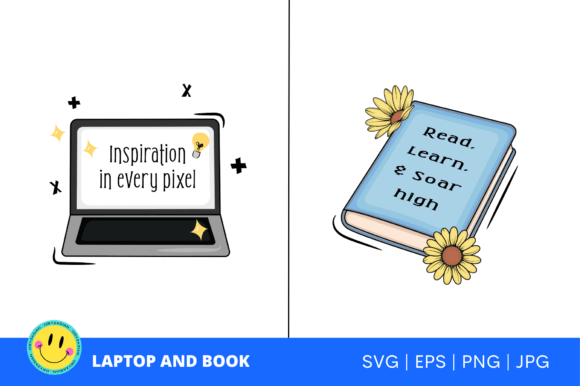
The package includes two distinct design files (one with a laptop, one with a book), each delivered in six complementary formats:
- 2 PNG files — High-resolution (300 dpi), transparent background, ideal for website banners, email headers, or slide decks where pixel-perfect clarity is non-negotiable.
- 2 JPG files — Optimized for fast loading on blogs, social previews, or printed handouts when vector flexibility isn’t needed.
- 2 EPS files — Fully editable in Adobe Illustrator, CorelDRAW, Affinity Designer, or any vector-capable application. Resize infinitely without quality loss—critical for logo variations, signage, or print collateral.
- 2 SVG files — Ready for Cricut, Silhouette, or web use. Scalable, lightweight, and compatible with modern browsers and cutting machines—perfect for custom merch, classroom decorations, or interactive web elements.
- JPG preview images — Accurate, context-rich representations of how each design looks in realistic settings (e.g., mockups on notebooks, laptop screens, or classroom walls).
- A letter from the owner — Not marketing copy, but a grounded note on intent, usage boundaries, and how this asset fits into broader creative stewardship.
- Freebies — Bonus resources selected to extend utility: a printable goal-planning sheet, a color palette guide (HEX/RGB), and a brief “how to adapt for your niche” checklist.
This format diversity isn’t about padding a list—it’s about reducing friction. If you’re a freelance educator building a new workshop, you’ll use the SVG for student welcome signs and the EPS to tweak colors for your brand. If you’re a solopreneur redesigning your newsletter, the PNG drops cleanly into Mailchimp; the JPG works in Canva templates without conversion steps. No re-exporting. No upscaling. No licensing guesswork.
Where It Fits in Your Process
Think of “A Laptop and a Book – Back to School” as a *transition marker*—not an end point, not a standalone tool, but a visual anchor that gains meaning through placement and timing.
Before a project: Use it during planning phases to define scope and tone. Insert the laptop version into your Notion roadmap as a header for “digital systems overhaul”; pin the book variant beside your curriculum outline in Trello. It signals focus—not just “I’m starting,” but “I’m starting with structure and intention.”
During execution: Embed it in deliverables where credibility and cohesion matter. A coach might add the book variant to a PDF workbook cover; a developer documenting a new tool could use the laptop version in GitHub READMEs or internal wikis. Because all files are production-ready, there’s no delay waiting for design approval or asset handoff.
After completion: Repurpose it as a reflection prompt. Print the JPG at 8×10, frame it beside your desk, and annotate it with notes on what worked, what shifted, and what you’d carry forward. The letter from the owner encourages this kind of grounded review—not celebration for its own sake, but calibration for what comes next.
Compatibility and Integration—No Setup Required
This isn’t software that needs installation, configuration, or API keys. It’s a set of static assets that work where you already work:
- Design tools: Open EPS in Illustrator to recolor, rearrange, or combine with your brand fonts. Edit SVG directly in Figma or VS Code if you need precise path control.
- Cutting machines: Load SVGs into Cricut Design Space or Sure Cuts A Lot—no tracing, no cleanup. Tested with standard mat sizes and common materials (vinyl, cardstock, iron-on).
- Content platforms: Upload PNGs to Substack, Ghost, or WordPress without compression warnings. Use JPGs in Canva, Google Slides, or Loom thumbnails—no pixelation at default display sizes.
- Print & production: The 300 dpi PNGs and EPS files meet commercial print requirements for brochures, posters, or presentation handouts—no uprezzing or interpolation needed.
There’s no vendor lock-in. No subscription. No watermark. You own the files outright—meaning you can archive them, version them, rename them, or embed them in client deliverables (within standard commercial license terms). That predictability matters when you’re managing multiple projects across tools, teams, or timelines.
Practical Implementation Tips
Here’s how users consistently get more out of this asset—without overcomplicating it:
- Start with your use case—not the file. Ask: “Where do I need visual consistency most right now?” A teacher prepping fall syllabi? Use the book variant in Google Docs headers and printed agendas. A marketer relaunching a lead magnet? Apply the laptop version to landing page hero sections and thank-you emails.
- Batch your adaptations. Open the EPS in Illustrator once, change colors to match your palette, save as a new EPS, then export updated PNG/SVG/JPG versions in one go. Takes under five minutes—and ensures every format reflects your current brand.
- Store smartly. Create a dedicated folder named “BackToSchool_Assets” inside your main project directory or cloud-synced assets library. Include the freebies and owner’s letter as PDFs—so context stays attached to the files.
- Use the freebies intentionally. The goal-planning sheet isn’t filler—it’s calibrated for 90-day cycles. Fill it out *before* opening the design files. That way, the visual asset reinforces decisions you’ve already made—not the other way around.
- Revisit, don’t replace. Save previous versions of edited files (e.g., “Laptop_BTS_Spring24_v2.eps”). Over time, these become a low-effort visual timeline of your growth—useful for portfolio reviews, grant applications, or annual retrospectives.
Long-Term Utility Beyond the Season
“Back to school” implies seasonality—but the core idea—a laptop representing digital action and a book representing grounded learning—is evergreen. Users report repurposing these files year after year: as “Q4 Planning” headers, “New Client Onboarding” visuals, “Skill-Building Sprint” banners, or even “Team Knowledge-Sharing” slide templates. The strength lies in duality: it bridges execution and reflection, technology and tradition, speed and depth.
Because the files are editable and resolution-agnostic, they scale with your work—not just in size, but in sophistication. A beginner blogger uses the JPG in a Canva template. A seasoned designer imports the EPS into a multi-layered brand system. A small business owner prints the SVG on tote bags for team retreats. The same asset, different levels of engagement—no re-purchase, no upgrade path, no learning curve beyond your existing tools.
That’s the quiet advantage: it doesn’t ask you to change how you work. It meets you where you are—with clean files, clear intent, and zero friction between idea and implementation.